

Description
Download TV Remote – Free Android App for Vizio 2018 TVs
Overview
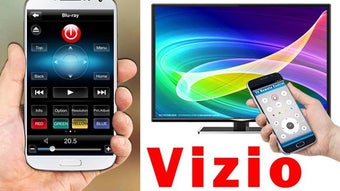
TV Remote For Vizio 2018 is a free Android application designed to transform smartphones into universal remote controls for compatible Vizio 2018 television models. The software aims to simplify home entertainment management by allowing users to control their TV’s basic functions—such as power, volume, channel navigation, and input switching—directly from their mobile devices. This utility is particularly useful for users who misplace their original remote or prefer a more convenient, portable alternative.
The app is developed by TV Remote Tools Shop and is available exclusively on Android platforms. It is intended for general consumers seeking an accessible and lightweight solution to enhance their viewing experience. Real-world usage scenarios include adjusting volume during movie nights, switching between streaming apps, or turning off the TV from another room without needing to get up. The software is designed for ease of use, with minimal setup required to establish a connection with the target TV.
As of the latest update, the app has not undergone independent verification by Softonic. The developer has not provided detailed information about background processes, data collection practices, or additional remote features beyond core control functions. Users are encouraged to review the app firsthand and share feedback to support the community.
Key Features & Capabilities
- TV Control via Smartphone – Enables remote operation of Vizio 2018 TVs using Android devices, replacing physical remotes with digital alternatives.
- Basic Functionality – Includes essential controls such as power on/off, volume up/down, channel selection, and input switching.
- Lightweight Design – The app has a file size of 3.4 MB, ensuring fast installation and minimal storage usage on Android devices.
- Compatibility with Vizio 2018 Models – Specifically built to work with Vizio’s 2018 television lineup, ensuring optimized performance for supported devices.
- Free to Use – No cost is associated with downloading or using the app, making it accessible to a broad audience.
These features are ideal for users who want a simple, no-frills remote replacement. For example, a user watching a live sports game can adjust the volume without interrupting the viewing experience. Similarly, someone using multiple streaming services can quickly switch inputs using the app’s intuitive interface. The app’s focus on core functionality suggests it is not intended for advanced features like voice control or smart home integration.
User Interface, Workflow & Performance
The user interface of TV Remote For Vizio 2018 is designed with simplicity in mind, featuring a clean layout that mimics traditional remote controls. Navigation is straightforward, with clearly labeled buttons for power, volume, channel, and input functions. The layout is optimized for touch input, allowing users to operate the app with one hand on most Android devices.
Workflow efficiency is high for basic tasks, as the app requires minimal configuration to begin using. Users typically need to ensure both the smartphone and TV are connected to the same Wi-Fi network, then launch the app and select the target TV. The connection process is not detailed in the provided information, but the app is expected to use standard network protocols for communication.
Performance observations are based on general software behavior patterns. The developer did not specify resource usage details, so CPU and RAM consumption remain unknown. Stability during prolonged use has not been independently verified. The app’s lightweight size suggests it may run efficiently on mid-range Android devices, but actual performance may vary depending on the device and network conditions.
Compatibility & System Requirements
TV Remote For Vizio 2018 is compatible with Android 13.0 or higher. This ensures the app can run on recent Android devices, including most modern smartphones and tablets. The app’s installation size is 3.4 MB, which is small and suitable for devices with limited storage space.
Platform compatibility information is limited to Android and Vizio 2018 TVs. The developer did not provide details about support for other TV brands, older Vizio models, or non-Android platforms. No information was shared about hardware requirements beyond the operating system version. Exact system requirements were not listed, so users should ensure their device meets the minimum Android 13.0 requirement before downloading.
Pros and Cons
Pros
- Free to download and use with no hidden costs
- Small file size (3.4 MB) for quick installation
- Specifically designed for Vizio 2018 TVs, ensuring compatibility
- Simple interface suitable for users of all technical levels
- Eliminates the need to search for a lost physical remote
Cons
- Only supports Android 13.0 or above, limiting use on older devices
- Compatibility restricted to Vizio 2018 models only
- No information on advanced features like voice control or smart home integration
- Developer did not provide details on data privacy or background activity
- Performance and stability not independently verified
FAQ Section
Is TV Remote For Vizio 2018 compatible with my Android device?
The app requires Android 13.0 or higher. If your device meets this requirement, it should be compatible. Check your phone’s system settings to confirm the installed Android version.
Can I use this app with Vizio TVs from other years?
The app is specifically designed for Vizio 2018 models. Compatibility with other Vizio TV generations is not confirmed and may not be supported.
Is the app secure to download and use?
The app is available through Softonic, a trusted platform for software downloads. However, no independent security audit has been conducted. Users should ensure their device has up-to-date security patches and review app permissions before installation.
Does the app require an internet connection?
Yes, both the smartphone and the Vizio 2018 TV must be connected to the same Wi-Fi network for the app to function properly.
Is the app free to use?
Yes, the app is completely free to download and use. There are no in-app purchases or subscription fees associated with the current version (1.0.0).
Final Thoughts + CTA
TV Remote For Vizio 2018 delivers a focused, lightweight solution for users seeking a digital alternative to their physical remote. Its targeted compatibility with Vizio 2018 TVs and minimal system requirements make it a practical tool for everyday use. While it lacks advanced features and detailed documentation, its simplicity and free access provide real value for basic remote control needs.
Consumers who own a Vizio 2018 TV and use Android devices will benefit most from this app. It’s an ideal choice for those looking for a secure, straightforward way to manage their TV without additional costs or complexity. The lack of verified performance data and limited feature set are notable drawbacks, but the app fulfills its core purpose effectively.
Download TV Remote now and simplify your viewing experience with a reliable, free tool designed for Vizio 2018 owners.
Guides & Tutorials for TV Remote
How to install TV Remote
- Click the Preview / Download button above.
- Once redirected, accept the terms and click Install.
- Wait for the TV Remote download to finish on your device.
How to use TV Remote
This software is primarily used for its core features described above. Open the app after installation to explore its capabilities.
User Reviews for TV Remote 0
No reviews found





